Print Reports
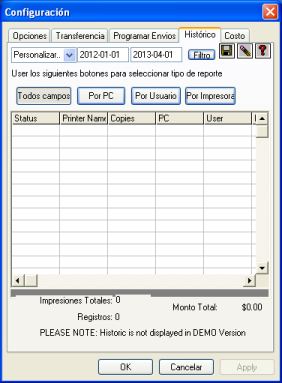
Cyberprinter has two different types of windows for viewing print records:
- The daily log
- The historical log
Separating these into two window types is useful to avoid issues when generating reports, as it can be confusing to include data whose status may change at any moment.
Cyberprinter keeps a log of the current day’s activity in the section known as the daily log. On the following day, the previous day’s data is moved to a general file known as the historical log.
Three operations can be performed with this historical file:
1. Save as a text file
Click the button with the disk icon. Then enter a name for your file. The file format will be text, with each field separated by commas. If desired, you can open the file with your preferred spreadsheet application.
2. Delete historical log
The more data stored in the historical log, the slower it becomes to display it. It is recommended to back up the historical data and then delete it to improve performance. Only the authorized password holder can perform this operation.
3. Data filtering
You can filter the data according to the following criteria:
- Previous Day (current day data is located in the daily log window)
- This Week (the week starts on Sunday)
- This Month (the month starts on the first day)
- Custom (you can choose a date range and then press the FILTER button)
Statistics
Displays the total number of printouts according to the selected filter (Total Printouts), as well as the total cost of those printouts (Total Amount).